Notice. New forum software under development. It's going to miss a few functions and look a bit ugly for a while, but I'm working on it full time now as the old forum was too unstable. Couple days, all good. If you notice any issues, please contact me.
mozzie Guru Joined: 15/06/2020 Location: AustraliaPosts: 469
Posted: 04:17am 15 Aug 2026
Copy link to clipboard
Print this post
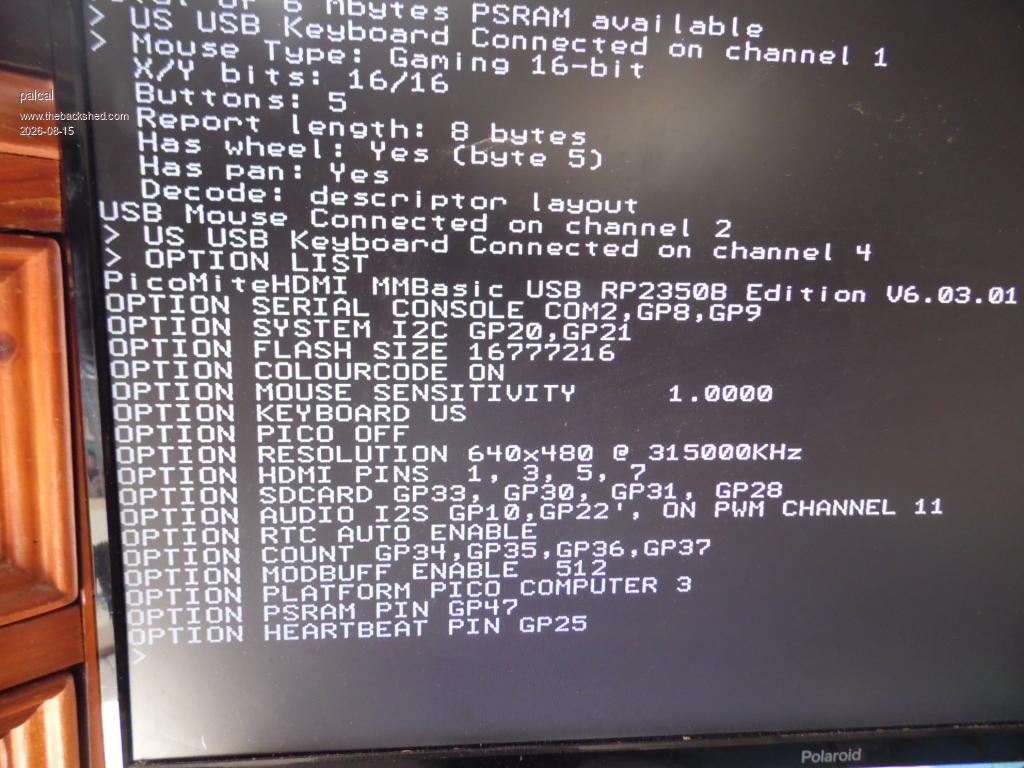
G'day Palcal, Have you tried setting OPTION MOUSE SENSITIVITY 1 in your option list, this often solves mouse related problems.
Bit odd seeing the keyboard twice, this may be an issue. Can you please post your option list and make / model of the keyboard / mouse you are using? someone may have seen this before.
Regards, Lyle.
palcal Guru Joined: 12/10/2011 Location: AustraliaPosts: 2053
Posted: 05:03am 15 Aug 2026
Copy link to clipboard
Print this post
Thanks Lyle, OPTION MOUSE SENSITIVITY ONE seems to have fixed the mouse problem but still says Keyboard connected to Chanel 1 and Chanel 4 I tried 2 keyboards a Microsoft and a HP. If I disconnect and reconnect the keyboard it says KEYBOARD CONNECTED TO CHANEL 1 so it all works ok but I don't know why it also says Keyboard connected to chanel 4 on reboot.
Edited 2026-08-15 15:59 by palcal"It is better to be ignorant and ask a stupid question than to be plain Stupid and not ask at all"
Bryan1 Guru Joined: 22/02/2006 Location: AustraliaPosts: 2297
Posted: 02:25am 17 Aug 2026
Copy link to clipboard
Print this post
Ok this is weird now I have 3D printed cases for my 5 boards I put the same .uf file on 4 boards, now board 1 and 2 have talking with each other for weeks so today setup board 3 and 4 only to find with exact same main.py and club.py it won't startup after a reset or power on.
Also I did put board 1's SDCard in and found the same problem where it didn't bootup on startup.
Now doing a run('/sd/club.py') does bootup club.py so something isn't right, I have edited the main.py on board 4 to be the same as board 2
Also when I had board 3 and board 4 running got the IP address's off Board 2 after they connected.
So surely this couldn't be a hardware issue
Regards Bryan
Bryan1 Guru Joined: 22/02/2006 Location: AustraliaPosts: 2297
Posted: 06:49am 17 Aug 2026
Copy link to clipboard
Print this post
Well after close to 2 hours found the problem both board 1 and 2 had a main.py on flash so by adding the main to flash on 3 and 4 fixed it
So now got 4 PICO 3 boards all running club.py and when any 2 are connected they auto connect to wifi then boot and with the GPS on one unit the other unit shows the GPS in the ticker window, file transfer is rock solid too so now got it all sorted for tomorrow night
So this afternoon working on 3D Model Editor where we finally fixed the 'Radius' function so it works nicely and when the push to github gets done I will provide a link.
Regards Bryan
LeoNicolas Guru Joined: 07/10/2020 Location: CanadaPosts: 625
Posted: 02:30pm 17 Aug 2026
Copy link to clipboard
Print this post
Lizby
I have sent you a private message. I'm back home.
palcal Guru Joined: 12/10/2011 Location: AustraliaPosts: 2053
Posted: 03:08am 18 Aug 2026
Copy link to clipboard
Print this post
Everything was working well, I disconnected and switched USB Hub switch to disable so I could load a program but the serial port will not show up on TeraTerm or MMCC. I disconnected an reconnected hoding down the Boot switch and that works ok, so I have a connection but still no serial port."It is better to be ignorant and ask a stupid question than to be plain Stupid and not ask at all"
mozzie Guru Joined: 15/06/2020 Location: AustraliaPosts: 469
Posted: 04:17am 18 Aug 2026
Copy link to clipboard
Print this post
G'day Palcal, If you are using a Pico Computer 3 and have the HDMI-USB firmware loaded, the Micro-USB port is for uploading firmware only.
If you connect to your PC via the USB-3 port and look for a "USB-SERIAL CH340" this is the port to connect to via TeraTerm / MMCC etc.
Please note this must be set to 115200-8-N-1 to work.
Regards, Lyle.
palcal Guru Joined: 12/10/2011 Location: AustraliaPosts: 2053
Posted: 06:27am 18 Aug 2026
Copy link to clipboard
Print this post
Thanks for that Mozzie I knew it would be something simple that I overlooked, I was looking for the answer in the Pico Manual, guess I should have been reading through this thread."It is better to be ignorant and ask a stupid question than to be plain Stupid and not ask at all"
Bryan1 Guru Joined: 22/02/2006 Location: AustraliaPosts: 2297
Posted: 07:09am 18 Aug 2026
Copy link to clipboard
Print this post
This morning went and got the rest of the 2032 coin cells so all of my boards have the rtc and spent the morning getting board 3 and board 4 upto speed. So used the upload and took a picture of my car, renamed it as the phone will put a 20 digit filename then less than a minute later it showed on the screen of board 3.
So attached to my profile then sent my profile, main picture and thumbnail picture to Board 4 and sure enough it was there
So that's the club.py all ready for tonight with those boards, now with my last board I put HDMIUSBV6.03.01 on and it showed up on the lcd straight after booting.
6 Mbit of psram and doing a option list it was all configured so just had to put board 1 sdcard in to see if I could finally play mp.3's again.
Sure enough got into FM and clicked on a song and it played now in micropython it wouldn't even open the music folder let alone play a mp3.
So my next project and why I'm doing it in MMBasic is for Lyle so he can look at the code. Mentioned my project to claude and he bolted the gate saying PIO2 is used for audio you have to disable it for stepper use. So tomorrow I will sort claude out and the first step is to get 3DModel Editor converted over to doing G-Code aswell as STL
Regards Bryan
Martin H. Guru Joined: 04/06/2022 Location: GermanyPosts: 1572
Posted: 09:58am 10 Sep 2026
Copy link to clipboard
Print this post
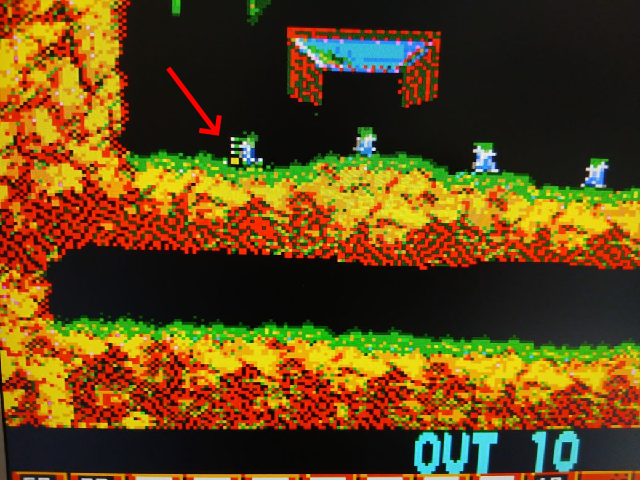
I may have missed something here, but is it common knowledge that the Pico Computer 3 swaps layers N and L? To explain: The crosshair are drawn on Layer L, so it should be in front of the background.(which is exactly what it does on the Picomite HDMI with the same firmware) As you can see from the example, it disappears behind the landscape on Layer N in addition: Mode 3 & 4 are not available in this resolution Edited 2026-09-10 20:08 by Martin H.'no comment
ville56 Guru Joined: 08/06/2022 Location: AustriaPosts: 646
Posted: 10:43am 10 Sep 2026
Copy link to clipboard
Print this post
TBH, I cannot imagine how the hardware should swap the layers .... I thought they are implemented in the firmware. Do you have an explanation for me?
Gerald 73 de OE1HGA, Gerald
Mixtel90 Guru Joined: 05/10/2019 Location: United KingdomPosts: 9234
Posted: 10:55am 10 Sep 2026
Copy link to clipboard
Print this post
Nope, that has to be a firmware or software thing. The hardware consists of only resistors and a socket no matter whether it's VGA or HDMI. Mess up any of those connections and something won't work or will mess up the colours.Mick
Working perfectly on USB keyboard and mouse but with PC 3 USB C connected to putty on Linux Mint 22.3 it fails to see the PC 3. dmesg | grep does not see any tty devices connecting.
Tried 3 different known good USB C cables to no avail. As a further double check, using same USB cable, connected to a Pimoroni 2W also running 6.03.02b3 and it works fine.
Will try to get a CRO onto GPIO 8 and 9 tomorrow but any suggestions in the meantime?... almost all of the Maximites, the MicromMites, the MM Extremes, the ArmMites, the PicoMite and loving it!
matherp Guru Joined: 11/12/2012 Location: United KingdomPosts: 12051
Posted: 07:23am 13 Sep 2026
Copy link to clipboard
Print this post
The design uses a ch340 chip which should be recognised even if the PC3 has no firmware loaded. This is the 16-pin SOP chip just inboard from the usb-c port. Try it on a windows machine if available and assuming nothing there check the orientation of the chip and the soldering of it and the usb-c connector. Finally, try spraying the USB-C with contact cleaner. I had one board back from JLC with some sort of contamination on the connector that only worked after I cleaned it.
phil99 Guru Joined: 11/02/2018 Location: AustraliaPosts: 3416
Posted: 07:26am 13 Sep 2026
Copy link to clipboard
Print this post
As the cable is OK it must be either the USB C connector soldering or the USB/TTL chip. Others have had to re-solder things on this board so a magnifying glass may help find the problem.
A bit slow again! Edited 2026-09-13 17:29 by phil99
Mixtel90 Guru Joined: 05/10/2019 Location: United KingdomPosts: 9234
Posted: 07:40am 13 Sep 2026
Copy link to clipboard
Print this post
You'd be surprised at how many USB cables have no data connections. After having a look through my tangle I have about 6 with (2 of which I specifically bought for data) and 10 without. If a manufacturer can get away with supplying a 2-wire cable with a USB charger then they quite often will - and they don't usually seem to make the cores any bigger to handle more current.
I really must have another sort through my cables. I've tagged some of them but not all.Mick
panky Guru Joined: 02/10/2012 Location: AustraliaPosts: 1135
Posted: 07:50am 13 Sep 2026
Copy link to clipboard
Print this post
Managed to get a CRO onto GPIO 8 and 9 - activity so it looks like the USB C socket - bugger! It is impossible to see the solder connections as they are under the device!
Might have to chance it and hit it with the heat gun without destroying anything!
Yahoo!!! Gave it a good dose of the heat gun and now have Serial console working on /dev/ttyUSB0. Edited 2026-09-13 17:54 by panky... almost all of the Maximites, the MicromMites, the MM Extremes, the ArmMites, the PicoMite and loving it!
matherp Guru Joined: 11/12/2012 Location: United KingdomPosts: 12051
Posted: 09:26am 13 Sep 2026
Copy link to clipboard
Print this post
All: If you see this sort of issue, please do report it to JLC or the person who ordered the boards for them to report. If JLC need a process improvement they need to know about it.
v.lenzer Senior Member Joined: 04/05/2024 Location: GermanyPosts: 157
Posted: 10:46am 13 Sep 2026
Copy link to clipboard
Print this post
I have got the same problem and solved it: dead USB_C Edited 2026-09-13 20:47 by v.lenzerBest wishes! Joachim
Martin H. Guru Joined: 04/06/2022 Location: GermanyPosts: 1572
Posted: 06:57am 15 Sep 2026
Copy link to clipboard
Print this post
I modified the cutouts on the Pico Computer 2 case so that it fits the Pico Computer 3 . 3D-Printed Model I didn't design the case; I just customized it. Cheers Martin Edited 2026-09-15 17:02 by Martin H.'no comment
Page 7 of 10
Print this page
The Back Shed's forum code is written, and hosted, in Australia.

 Notice. New forum software under development. It's going to miss a few functions and look a bit ugly for a while, but I'm working on it full time now as the old forum was too unstable. Couple days, all good. If you notice any issues, please contact me.


 Print this post