| |
  Page 7 of 8 Page 7 of 8   |
| Author |
Message |
matherp
Guru

Joined: 11/12/2012
Location: United KingdomPosts: 12056 |
| Posted: 04:47pm 19 Apr 2026 |
 Copy link to clipboard Copy link to clipboard |
 Print this post |
|
V6.02.02B6
PicoMiteRP2040V6.02.02B6.zip
PicoMiteRP2350V6.02.02B6.zip
These versions do not contain the experimental performance optimisation discussed in another thread but should have a very small performance improvement over B5
Couple of tweaks to FM - solves the press ctrl-c 3 times issue
All Versions
LIST COLLISIONS
This is a diagnostic that shows any variable names that hash to the same number. It then allows you to change one of the names to break the collision. Doing this will have a small performance gain. For diagnostic purposes, it is recommended to run this in the subroutine deepest in the program structure to help capture the most collisions. Subroutine LOCAL variables are deleted on exit so just running this at the end of a program won't give the best information.
OPTION PROFILING ON
Add this at the top of a program and the firmware will capture useful information about command usage and subroutine calls and how long they take to run allowing you to identify program hotspots. The listing is produced when the program hits an explcit END statement. Ctrl-C or a program that finishes withou an END statement will not produce any profiling information. |
| |
javavi

Guru
Joined: 01/10/2023
Location: UkrainePosts: 621 |
| Posted: 05:02pm 19 Apr 2026 |
Copy link to clipboard |
Print this post |
|
@matherp

Peter, there are so many cool new features that it's worthy of a minor PicoMite update!

I suggest renumbering PicoMite to version 6.03 to at least somehow differentiate it from previous features and avoid confusion. |
| |
terekgabor
Senior Member

Joined: 02/01/2026
Location: HungaryPosts: 155 |
| Posted: 05:18pm 19 Apr 2026 |
Copy link to clipboard |
Print this post |
|
@matherp
Thanks Peter very much again!
Very good functions!
Are you planning to include the mentioned performance optimisation in later versions?
G@bor |
| |
matherp
Guru
Joined: 11/12/2012
Location: United KingdomPosts: 12056 |
| Posted: 06:53pm 19 Apr 2026 |
Copy link to clipboard |
Print this post |
|
V6.02.02B7
PicoMiteRP2040V6.02.02B7.zip
PicoMiteRP2350V6.02.02B7.zip
I'm on a roll this afternoon 
Changes to FM:
If you are showing the same directory in both panels, both will update if you delete/rename/new a file in one
If you edit a basic file and then exit the editor with F2 the program will now be immediately run
Changes to the editor:
NO MORE "LINE IS TOO LONG"
Long lines will now scroll left and right as you move the cursor allowing you to edit lines longer than the screen without splitting them or using continuation lines. |
| |
JanVolk
Guru
Joined: 28/01/2023
Location: NetherlandsPosts: 420 |
| Posted: 06:53pm 19 Apr 2026 |
Copy link to clipboard |
Print this post |
|
Peter,
Thanks for fixing the stopping of .bas, which had started in FM and is now working normally again.
Jan. |
| |
terekgabor
Senior Member
Joined: 02/01/2026
Location: HungaryPosts: 155 |
| Posted: 07:00pm 19 Apr 2026 |
Copy link to clipboard |
Print this post |
|
Fantastic Peter!
Very-very good! I just switched of my PC after update to b6. Now start again  |
| |
terekgabor
Senior Member
Joined: 02/01/2026
Location: HungaryPosts: 155 |
| Posted: 07:43pm 19 Apr 2026 |
Copy link to clipboard |
Print this post |
|
@matherp
Peter!
Profiling I tried on Picocalc, only one small thing for it:
For bigger programs informations after end are more than one screen. But I can’t see the first section of information because scrolling. Can be good to pause before scrolling until press a key for example.
Same for LIST COLLISIONS.
G@bor
Edited 2026-04-20 05:47 by terekgabor |
| |
terekgabor
Senior Member
Joined: 02/01/2026
Location: HungaryPosts: 155 |
| Posted: 08:08pm 19 Apr 2026 |
Copy link to clipboard |
Print this post |
|
@matherp
Peter!
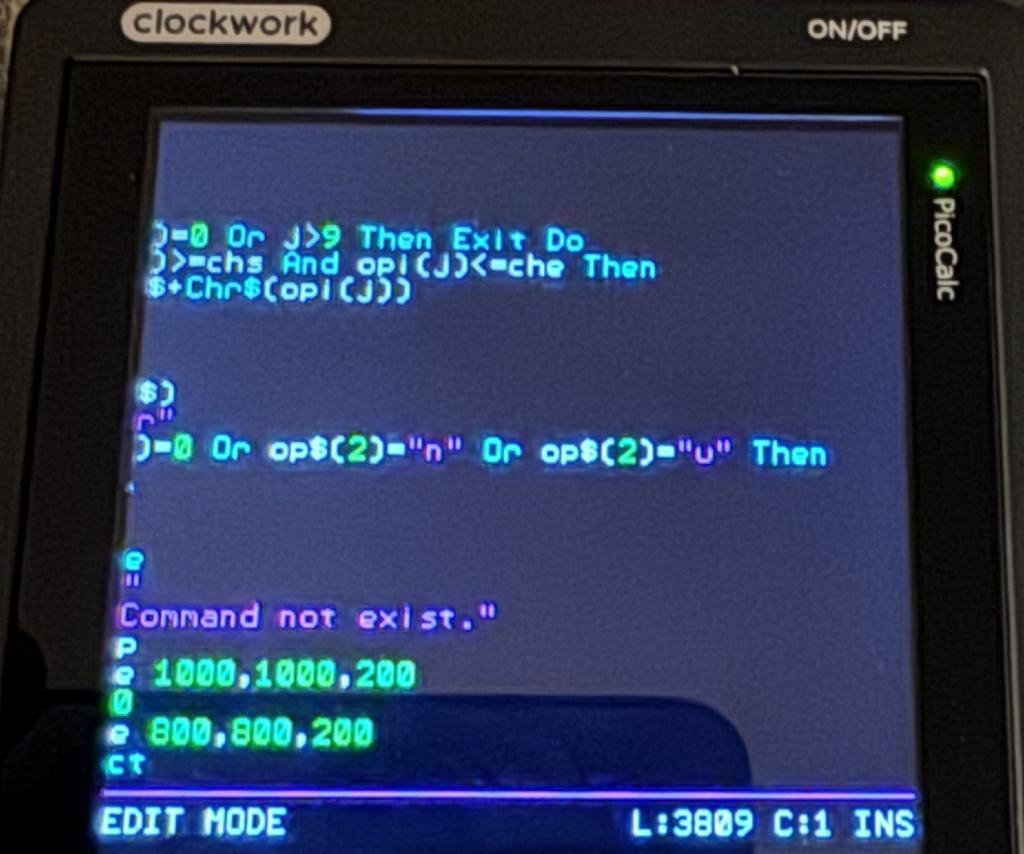
After writing a long line in Picocalc and press Enter I got the attached screen. From here I can’t go back to the beginning of the lines.
Only if I save and reopen editor.
Or pressing shift+Tab (home) twice to go to the top.
G@bor
Edited 2026-04-20 06:11 by terekgabor |
| |
JanVolk
Guru
Joined: 28/01/2023
Location: NetherlandsPosts: 420 |
| Posted: 08:14pm 19 Apr 2026 |
Copy link to clipboard |
Print this post |
|
After firmware update and copying from B: to A:, load no longer works correctly for A: and B:
External SDCARD reading does work.
PicoMite MMBasic RP2350A V6.02.02B7
Copyright 2011-2026 Geoff Graham
Copyright 2016-2026 Peter Mather
> option list
PicoMite MMBasic RP2350A V6.02.02B7
OPTION SYSTEM SPI GP10,GP11,GP12
OPTION SYSTEM I2C GP4,GP5
OPTION FLASH SIZE 16777216
OPTION COLOURCODE ON
OPTION HEARTBEAT OFF
OPTION PICO OFF
OPTION CPUSPEED (KHz) 200000
OPTION DISPLAY 50, 100
OPTION SDCARD GP15
OPTION RTC AUTO ENABLE
OPTION F1 help
OPTION F5 list commands
OPTION F6 list functions
OPTION F7 list pins
OPTION F8 option list
OPTION F9 fm
> load "aadkas3-test1-V6.02.02B2-RP2350A.bas
Error : Flash erase problem
> load "aadkas3-test2-V6.02.02B2-RP2350A.bas
Error : Flash erase problem
> load "visvoer-controller.bas
Error : Flash erase problem
> chdir "makerpi2350"
> files
B:/makerpi2350
20:22 19-04-2026 163 knipper.bas
> load "knipper.bas
Error : Flash erase problem
Jan.
|
| |
terekgabor
Senior Member
Joined: 02/01/2026
Location: HungaryPosts: 155 |
| Posted: 08:18pm 19 Apr 2026 |
Copy link to clipboard |
Print this post |
|
@JanVolk have you made flash nuke before update?
For me no problem with a: or b:
G@bor |
| |
JanVolk
Guru
Joined: 28/01/2023
Location: NetherlandsPosts: 420 |
| Posted: 08:27pm 19 Apr 2026 |
Copy link to clipboard |
Print this post |
|
Okay.
I'll do that. Clear_Flash_RP2350.uf2
I had to do this with B5 on the RP2040 as well. Clear_Flash.uf2.
Jan. |
| |
terekgabor
Senior Member
Joined: 02/01/2026
Location: HungaryPosts: 155 |
| Posted: 08:38pm 19 Apr 2026 |
Copy link to clipboard |
Print this post |
|
@matherp
I just testing new long lines. I can’t mark whole long line, I got line is too long error. And I can’t mark long lines char by char marking from left to right. Marking stops at the edge of the screen.
G@bor |
| |
JanVolk
Guru
Joined: 28/01/2023
Location: NetherlandsPosts: 420 |
| Posted: 08:48pm 19 Apr 2026 |
Copy link to clipboard |
Print this post |
|
It works correctly now.
The editor works much better with this version. The line break is now detected automatically and the cursor moves automatically to the next line.
Jan. |
| |
matherp
Guru
Joined: 11/12/2012
Location: United KingdomPosts: 12056 |
| Posted: 09:42pm 19 Apr 2026 |
Copy link to clipboard |
Print this post |
|
terekgabor: will fix both issues tomorrow |
| |
Bryan1

Guru
Joined: 22/02/2006
Location: AustraliaPosts: 2297 |
| Posted: 12:18am 20 Apr 2026 |
Copy link to clipboard |
Print this post |
|
Peter as Mozzie has said with the stepper code it does the step command at 1.5uS so would there be any chance of a new option to slow it down to 2.5uS so the DM556 could be used as the stepper driver. |
| |
matherp
Guru
Joined: 11/12/2012
Location: United KingdomPosts: 12056 |
| Posted: 07:43am 20 Apr 2026 |
Copy link to clipboard |
Print this post |
|
The problem is that the pulse generation is blocking in a 100kHz interrupt routine. So, even with a 1.5 uS pulse (actually 2uS but some processing take place before the pulse is started) 20% of cpu time is used generating the pulse.
I have a possible solution but this will need testing Mozzie and Bryan1 please let me know what version of the firmware you are running and I'll post a test version on the stepper thread. |
| |
Frank N. Furter
Guru
Joined: 28/05/2012
Location: GermanyPosts: 1156 |
| Posted: 09:05am 20 Apr 2026 |
Copy link to clipboard |
Print this post |
|
@matherp:
Thank you very much for implementing the text viewer! 
Would it be possible to modify the viewer so that you can scroll back as well?
The text viewer in this file manager has this feature:: https://www.thebackshed.com/forum/ViewTopic.php?FID=16&TID=18791
The PicoCalc has a horrible keyboard. Sometimes it doesn't respond, and other times it responds too often. It would be really helpful if there were a way to scroll back...
I’ve noticed a minor glitch in the new file manager:
If you try to open a file in an unsupported image format, the font size in the manager changes afterwards – specifically, the font size becomes larger.
The font size only returns to normal once you close the manager and reopen it.
Frank |
| |
matherp
Guru
Joined: 11/12/2012
Location: United KingdomPosts: 12056 |
| Posted: 01:42pm 20 Apr 2026 |
Copy link to clipboard |
Print this post |
|
V6.02.02B8
PicoMiteRP2040V6.02.02B8.zip
PicoMiteRP2350V6.02.02B8.zip
Fixes bug where returning to FM after a failed image load changes the font
Fixes bug in AUTOSAVE CRUNCH
Fixes bug when pressing ENTER in a line that scrolls in the Editor
Extends long line support in the editor to MARK mode
Allows LIST command to both page up (up arrow key) or down (any other key) in both the LIST command and LIST invoked from the filemanager
Output from OPTION PROFILING ON now supports paging
Output from LIST COLLISIONS now supports paging
Pulse duration in the stepper now increased to around 10uSec. This works by setting the pulse at the end of one interrupt and cancelling it at the start of the next. This is the only way to reduce the overhead in the 100KHz interrupt routine and is UNTESTED |
| |
mozzie
Guru
Joined: 15/06/2020
Location: AustraliaPosts: 469 |
| Posted: 03:58pm 20 Apr 2026 |
Copy link to clipboard |
Print this post |
|
G'day Peter,
Initial testing of V6.02.02B8 Stepper system with a scope has shown the pulse width is around 9.5uS, should work nicely with most driver boards. I will be able to do some testing on the hardware later in the week (with a bit of luck...) This is on the base PicoMite RP2350 (with LCD)
On that subject, most of the commercial stepper driver boards use opto-coupled inputs, in 99% of applications these are wired either all active high or all active low, this allows 4 wires per axis (STEP/DIR/EN/COM). The PicoMite Stepper system currently has the step output active high, the enable active low, and the direction can be set to either if I have read the manual (and stepper files) correctly.
Would it be possible to allow inversion of the enable output to make all outputs active high? This also allows simple transistor buffers (as shown by Phil99) if the 3v3 signals are not enough.
Many thanks also for the file manager system, with the ability to use USB flash disks this is a great addition
Due to the relatively slow transfer speed via USB, would you consider adding a "working indicator" to show things are still proceeding, the old ascii - \ | / routine at the start of the status line perhaps, just a thought.
Regards, Lyle.
Footnote added 2026-04-21 02:26 by mozzie
FootNote: Just remembered the "Enable" input on a lot of these drives is really a DISABLE input ie: the drive is disabled when the "Enable" signal is applied (not very safe).
More thinking required. |
| |
JanVolk
Guru
Joined: 28/01/2023
Location: NetherlandsPosts: 420 |
| Posted: 04:00pm 20 Apr 2026 |
Copy link to clipboard |
Print this post |
|
Peter,
I think there is a problem with making a copy of the SD card (B) with the latest versions?
I first made a backup and flashed the latest version using the firmware update.
This all worked.
Then I restored the backup to the A: drive. (using FM)
That also all goes well, except when I load a file from A: and try to start it, I get an error message.
If I go to B: and load the file directly and then run it, it freezes.
After power off/on
> memory
Program:
320K (100%) Program (358 lines)
3K ( 1%) 1 Embedded C Routine
-3K (-1%) Free
Saved Variables:
16K (100%) Free
RAM:
0K ( 0%) 0 Variables
0K ( 0%) General
367K (100%) Free
PicoMite MMBasic RP2350A V6.02.02B8
OPTION SYSTEM SPI GP10,GP11,GP12
OPTION SYSTEM I2C GP4,GP5
OPTION FLASH SIZE 16777216
OPTION COLOR CODE ON
OPTION HEARTBEAT OFF
OPTION PICO OFF
OPTION CPU SPEED (KHz) 200000
OPTION DISPLAY 50, 100
OPTION SDCARD GP15
OPTION RTC AUTO ENABLE
OPTION F1 help
OPTION F9 fm
I think if I run Clear_Flash_RP2350.uf2 it will work properly again. I don't think this is the intended solution?
Jan. |
| |
| |
Page 7 of 8 |

 Notice. New forum software under development. It's going to miss a few functions and look a bit ugly for a while, but I'm working on it full time now as the old forum was too unstable. Couple days, all good. If you notice any issues, please contact me.