Notice. New forum software under development. It's going to miss a few functions and look a bit ugly for a while, but I'm working on it full time now as the old forum was too unstable. Couple days, all good. If you notice any issues, please contact me.
v.lenzer Senior Member Joined: 04/05/2024 Location: GermanyPosts: 157
Posted: 08:39pm 06 Aug 2026
Copy link to clipboard
Print this post
Hi Peter! I just flashed the new firmware V6.03.01, hoping to resolve some camera issues. However, I can no longer operate the camera using data pins GP30 through GP37. I get the following error message:
[26] Camera open ov2640 gp40,gp41,gp42,gp43,gp44,gp30 Error : Camera data pins D0..D7 must not cross the GPIO 32 boundary
It worked fine with version V6.03.00. It would be a shame if it no longer worked with the latest version, as I would no longer be able to use my PCB, which holds the camera and a WeAct board featuring the RP2350B.
Here are my options:
PicoMite MMBasic RP2350B V6.03.01 OPTION SYSTEM SPI GP6,GP3,GP4 OPTION SYSTEM I2C GP38,GP39 OPTION FLASH SIZE 16777216 OPTION COLOURCODE ON OPTION PICO OFF OPTION CPUSPEED (KHz) 200000 OPTION LCDPANEL ILI9341, LANDSCAPE,GP7,GP2,GP5 OPTION TOUCH GP14,GP15 OPTION SDCARD GP8 OPTION PSRAM PIN GP0Best wishes! Joachim
phil99 Guru Joined: 11/02/2018 Location: AustraliaPosts: 3416
Posted: 09:56pm 06 Aug 2026
Copy link to clipboard
Print this post
@JanVolk Would something like this do?
JanVolk Guru Joined: 28/01/2023 Location: NetherlandsPosts: 420
Posted: 10:24pm 06 Aug 2026
Copy link to clipboard
Print this post
That is also a perfectly fine solution, but I handled it the way I described in my manual. Unfortunately, I am unable to send my PDF example.
Jan. Edited 2026-08-07 08:43 by JanVolk
phil99 Guru Joined: 11/02/2018 Location: AustraliaPosts: 3416
Posted: 10:39pm 06 Aug 2026
Copy link to clipboard
Print this post
That link https://www.thebackshed.com/forum/uploads/JanVolk/2026-08-07_082405_FONT%20#1%20en%20FONT%20#4.pdf doesn't work in my browser, but this does:- https://www.thebackshed.com/forum/uploads/JanVolk/2026-08-07_082405_FONT%20%231%20en%20FONT%20%234.pdf
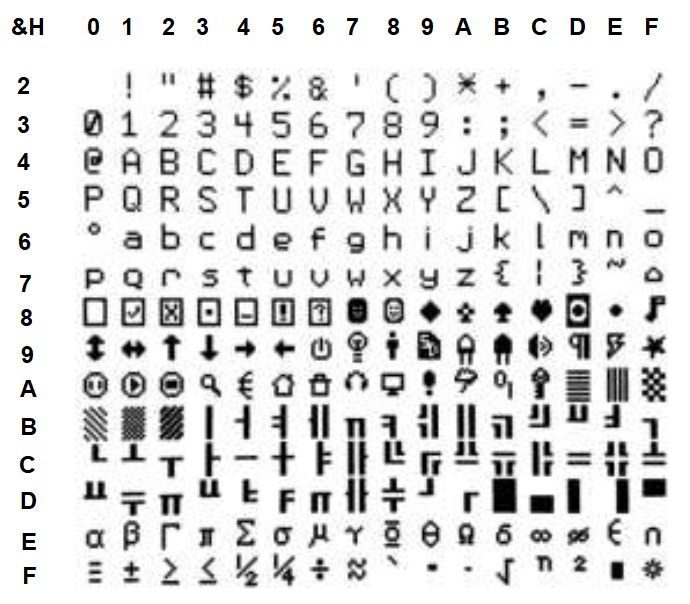
Edit. The advantage of Hex is there is no mental arithmetic needed.
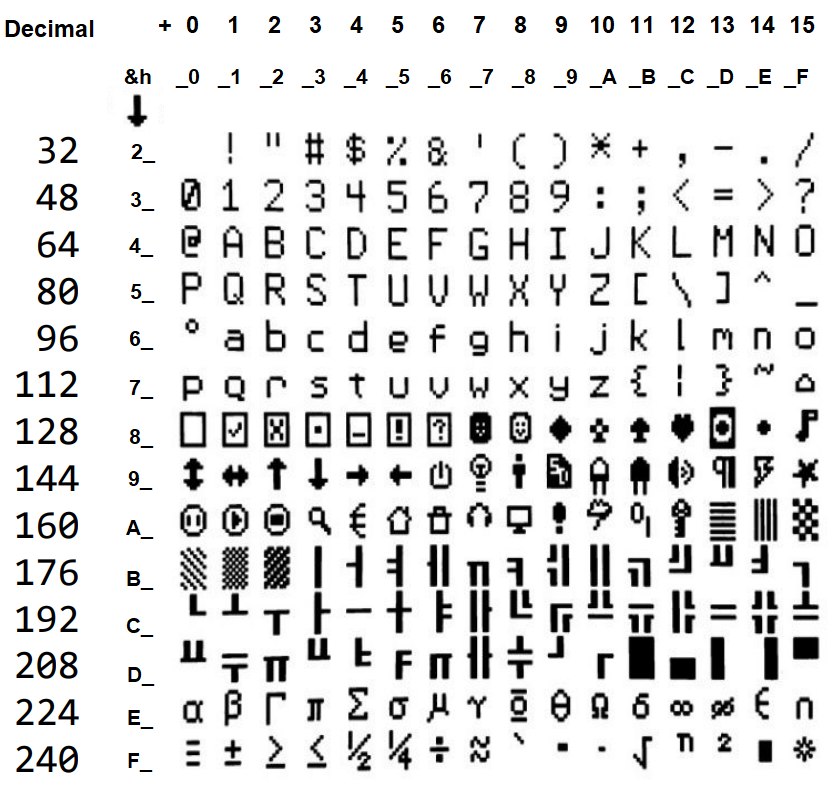
Curioser and Curioser, in Jan's original link "#" symbols have replaced "23" in the correct link. Looking at the ASCII chart with Hex values shows &H23 = # !!!!!!
Jan's uploads are at https://www.thebackshed.com/forum/uploads/JanVolk/ Scroll to the bottom of the list and you can see the uploads were successful but the clickable link was created incorrectly. Edited 2026-08-07 10:06 by phil99
toml_12953 Guru Joined: 13/02/2015 Location: United StatesPosts: 735
Posted: 11:59am 07 Aug 2026
Copy link to clipboard
Print this post
Why isn't chr$(&h3f)?
≤
phil99 Guru Joined: 11/02/2018 Location: AustraliaPosts: 3416
Posted: 12:28pm 07 Aug 2026
Copy link to clipboard
Print this post
So ≤ = &hF3 and ? = &h3F.
Mixtel90 Guru Joined: 05/10/2019 Location: United KingdomPosts: 9237
Posted: 12:35pm 07 Aug 2026
Copy link to clipboard
Print this post
&h30 is "0". The pattern follows along the numbers row until &h39 is "9". Sometimes it's easier to see the ASCII table in binary where a certain bit changes a mode. e,g, setting bit 2 makes a capital into lower case.Mick
Martin H. Guru Joined: 04/06/2022 Location: GermanyPosts: 1573
Posted: 01:20pm 07 Aug 2026
Copy link to clipboard
Print this post
@jan I’ve put together a collection of fonts before; Fonts for Mites perhaps you’ll find something suitable there, or maybe you have a specific request'no comment
toml_12953 Guru Joined: 13/02/2015 Location: United StatesPosts: 735
Posted: 03:01pm 07 Aug 2026
Copy link to clipboard
Print this post
Ah! I always was a bit backward.
co149 Newbie Joined: 30/07/2026 Location: United StatesPosts: 1
Posted: 01:00am 08 Aug 2026
Copy link to clipboard
Print this post
OK, this is one of those bugs that makes me think I'm just too pissed for mere words...
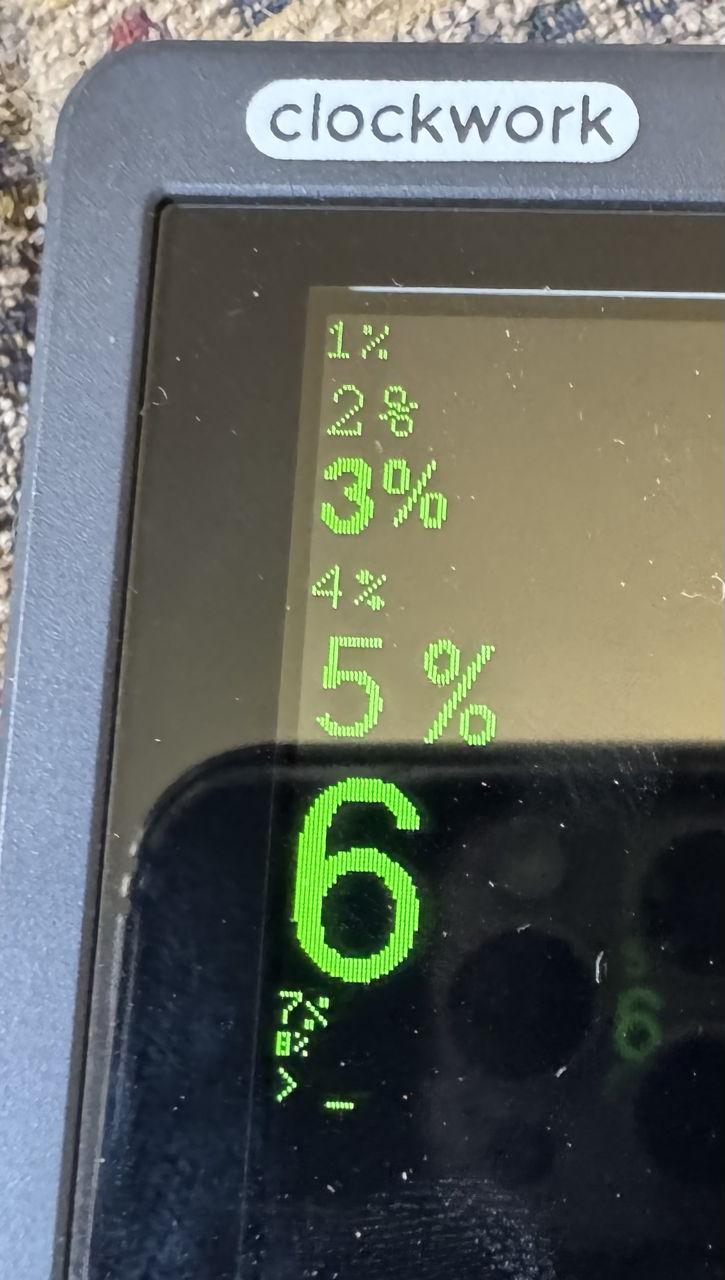
In Font 7 (and only Font 7) the percent sign ("%") is backwards!
Appears on PicoCalc ST7365P and the SSD1306I2C
(On mature consideration, maybe don't change it )
phil99 Guru Joined: 11/02/2018 Location: AustraliaPosts: 3416
Posted: 02:00am 08 Aug 2026
Copy link to clipboard
Print this post
Also on PicoMiteVGA MMBasic RP2350A Edition V6.03.01 so probably has always been that way on all versions.
toml_12953 Guru Joined: 13/02/2015 Location: United StatesPosts: 735
Posted: 02:55am 08 Aug 2026
Copy link to clipboard
Print this post
I had nothing to do with it!
ekaL moT
phil99 Guru Joined: 11/02/2018 Location: AustraliaPosts: 3416
Posted: 03:49am 08 Aug 2026
Copy link to clipboard
Print this post
A less ambiguous version. :)
BarryH Regular Member Joined: 05/01/2025 Location: AustraliaPosts: 53
Posted: 08:24am 08 Aug 2026
Copy link to clipboard
Print this post
Thanks PhilBarryH
JanVolk Guru Joined: 28/01/2023 Location: NetherlandsPosts: 420
Posted: 04:10pm 08 Aug 2026
Copy link to clipboard
Print this post
phil99,
Thank you. Even better for the PicoMite manual.
Jan.
mclout999 Guru Joined: 05/07/2020 Location: United StatesPosts: 527
Posted: 09:04am 09 Aug 2026
Copy link to clipboard
Print this post
On seeing it now, I can't unsee it. That's insidious. Oh, I would have never noticed. Not cool, dude.They call me Shai-Hulud (The maker)
Mixtel90 Guru Joined: 05/10/2019 Location: United KingdomPosts: 9237
Posted: 09:21am 09 Aug 2026
Copy link to clipboard
Print this post
I think that having it reversed for the "7" digit does look rather neat though. :)Mick
Peter, thanks a million for Ping. I'll put it in my latest project where I'll use it in a "Is Internet available?" procedure. I also had to overcome CGNAT as it's an IOT project working through a cell tower. John
homa Guru Joined: 05/11/2021 Location: GermanyPosts: 723
Posted: 01:25pm 09 Aug 2026
Copy link to clipboard
Print this post
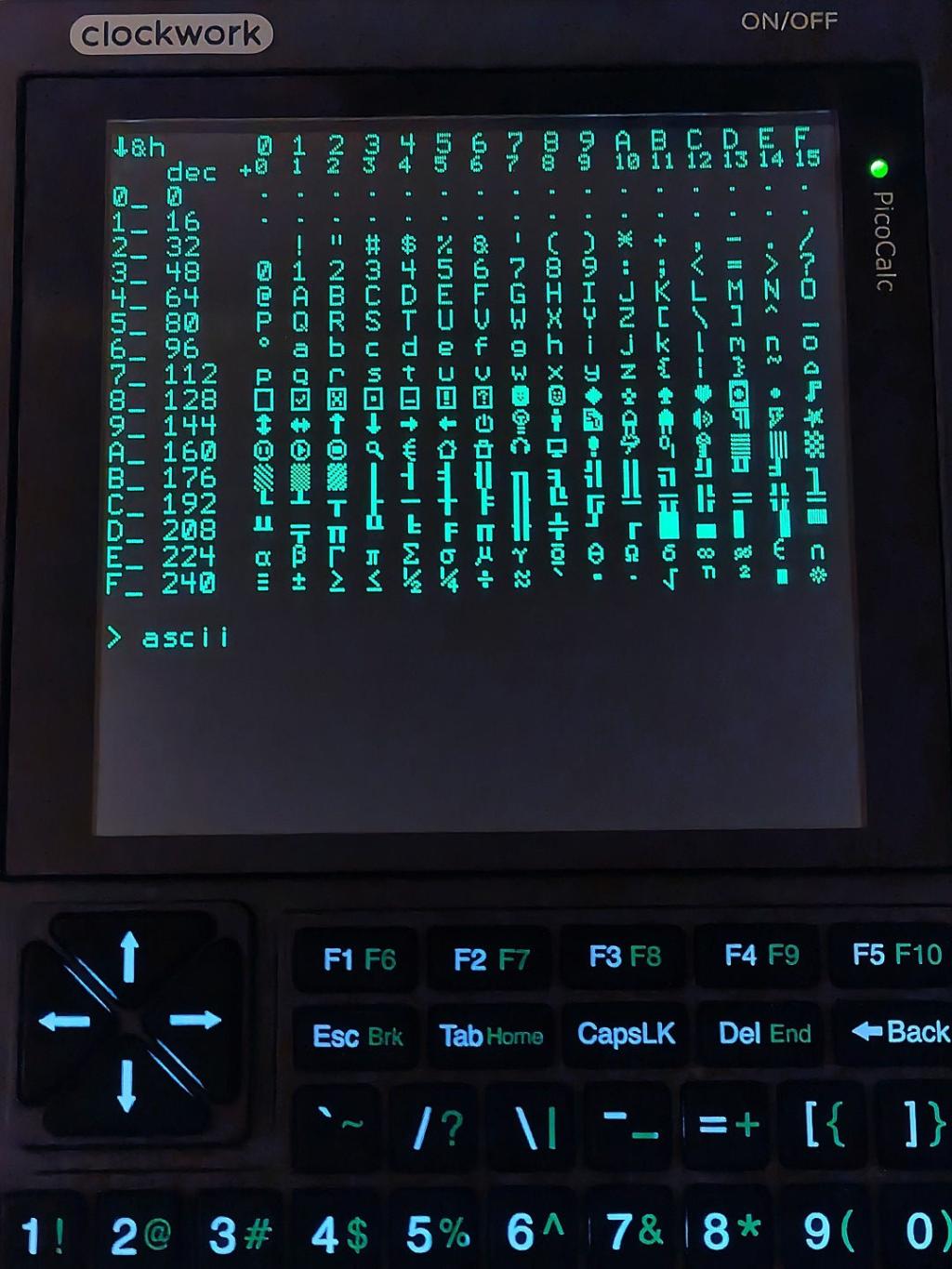
and for the library ;-) Matthias
ascii Sub ascii Print Chr$(27)+"[2J"+Chr$(27)+"[H" CLS Font 1 locate 1,1 Print Chr$(147);"&h" locate 2,4 Print "dec" locate 2,8 Print "+" For i=0 To 16 For j=1 To 16 c=(i-1)*16+j-1 If c Mod 16 = 0 And c>=0 Then locate i+2,1 If i>10 Then Print Chr$(54+i); Else Print Chr$(47+i); Print "_" locate i+2,3 Print c;"" End If locate i+2,j*2+7 If c<32 Then If c>=0 Then Print Chr$(&hfa) '"." Else locate i+1,j*2+7 If j>10 Then Print Chr$(54+j) Else Print Chr$(47+j) locate i+2,j*2+7 Font 7 Print Str$(j-1) Font 1 EndIf Else Print Chr$(c) End If Next Next locate 20,1 End Sub Sub locate(r,c) 'row,column Print @(MM.FONTWIDTH*(c-1),MM.FONTHEIGHT*(r-1)); End Sub
Edit: Print Chr$(27)+"[2J"+Chr$(27)+"[H" 'clear terminal Edited 2026-08-10 00:34 by homa
mozzie Guru Joined: 15/06/2020 Location: AustraliaPosts: 469
Posted: 05:19pm 09 Aug 2026
Copy link to clipboard
Print this post
G'day Peter, Have finally had a chance to sit down with the "Pico Computer 3" board and explore some of its power with MMBASIC V60301, many thanks once again for making this possible.
I may have stumbled across a gremlin, with V60300/V60301 it appears that OPTION SYSTEM SPI cannot be set on HDMIUSB builds, returns "Error : Invalid Option" no matter which pins are tried:
> option list PicoMiteHDMI MMBasic USB RP2350B Edition V6.03.01 OPTION SERIAL CONSOLE COM2,GP8,GP9 OPTION SYSTEM I2C GP20,GP21 OPTION FLASH SIZE 16777216 OPTION COLOURCODE ON OPTION KEYBOARD US OPTION PICO OFF OPTION RESOLUTION 640x480 @ 315000KHz OPTION HDMI PINS 1, 3, 5, 7 OPTION SDCARD GP33, GP30, GP31, GP28 OPTION AUDIO I2S GP10,GP22', ON PWM CHANNEL 11 OPTION RTC AUTO ENABLE OPTION COUNT GP34,GP35,GP36,GP37 OPTION PLATFORM PICO COMPUTER 3 OPTION HEARTBEAT PIN GP25 > option system spi gp2,gp3,gp4 Error : Invalid Option >
> option list PicoMiteHDMI MMBasic USB RP2350A Edition V6.03.01 OPTION SERIAL CONSOLE COM2,GP8,GP9 OPTION FLASH SIZE 4194304 OPTION COLOURCODE ON OPTION KEYBOARD US OPTION RESOLUTION 640x480 @ 315000KHz OPTION SDCARD GP22, GP26, GP27, GP28 > option system spi gp2,gp3,gp4 Error : Invalid Option > option system spi gp18,gp19,gp16 Error : Invalid Option >
Standard PicoMiteRP2350 builds work as expected:
> option list PicoMite MMBasic RP2350A V6.03.01 OPTION FLASH SIZE 4194304 OPTION COLOURCODE ON OPTION CPUSPEED (KHz) 200000 > option system spi gp26,gp27,gp28 >
Also a minor niggle, the inbuilt "LIST PINS" command loses a line after each "Press any key to continue" line is displayed on an LCD with "NOSCROLL" set, IE:
GP0-GP23 are on the first page and GP25-GP29 on the second with 320x480 and font 1 GP0-GP17 are on the first page and GP19-GP29 on the second with 320x480 and font 4
The line is lost on the LCD only, the console is not affected.
This version of Listpins stored in the library was fixed by adding a 'print' statement after the 'Loop Until Inkey$<>""'
Sub ListPins Local _q% If MM.Info(LCDPANEL)<>"" Then CLS For _q%=0 To MM.Info(max gp) Print "GP"+Str$(_q%)+Choice(_q%<10," "," "); Print LEFT$(Str$(MM.Info(pinno "GP"+Str$(_q%)))+" ",3); Print LEFT$(MM.Info(pin MM.Info(pinno "GP"+Str$(_q%))),MM.WIDTH-8) If (_q%+1) Mod (MM.HEIGHT-1)=0 And _q%<>0 Then Print "Press any key"; Do Loop Until Inkey$<>"" Print EndIf Next End Sub
Also for anyone not yet aware, the old RP2350 "Flash Nuke" will not work with the A4 rev chip, you need the new "Nuke Universal" to make it happen AFAIK now.
Thanks again.
Regards, Lyle.
Page 2 of 4
Print this page
The Back Shed's forum code is written, and hosted, in Australia.

 Notice. New forum software under development. It's going to miss a few functions and look a bit ugly for a while, but I'm working on it full time now as the old forum was too unstable. Couple days, all good. If you notice any issues, please contact me.


 Print this post



 )
)