Notice. New forum software under development. It's going to miss a few functions and look a bit ugly for a while, but I'm working on it full time now as the old forum was too unstable. Couple days, all good. If you notice any issues, please contact me.
Volhout Guru Joined: 05/03/2018 Location: NetherlandsPosts: 6195
Posted: 07:34am 16 Oct 2026
Copy link to clipboard
Print this post
Both boot switch and usb switch could be at the bottom side. Maybe domething for a rainy day.
The PC3 is a great design, but the USB is the only thing that I regret. The pico used as CDC can automatically be forced into update mode, without using a boot switch, and the tranfer speed is not limitted to 115200. So uploads and downloads are quick.
Anyway... who wants to update firmware? Mmbasic is almost complete as it is now. Few mire bugfix releases, and you never need the boot switch anymore.
hhtg1968 Senior Member Joined: 25/05/2023 Location: GermanyPosts: 248
Posted: 09:59am 16 Oct 2026
Copy link to clipboard
Print this post
silly questions:
how to use "update firmware" in detail?:
0. plug off usb-c power on pico3?
1. connect pc oder mac with usb a to usb micro on pico3?
2. enter "update firmware" on pico3?
3. pico3 "reboots" into update mode?
4. pico3 mounts on pc/mac?
5. place ...u2 on pico symbol on desktop of mac/pc?
6. what is with the switch "usb hub disable"?
mozzie Guru Joined: 15/06/2020 Location: AustraliaPosts: 469
Posted: 10:11am 16 Oct 2026
Copy link to clipboard
Print this post
G'day, During a firmware testing round the best bet is to simply leave the lid off, most of the boards here are simply naked (hopefully they'll get together and make some Pico Zero's)
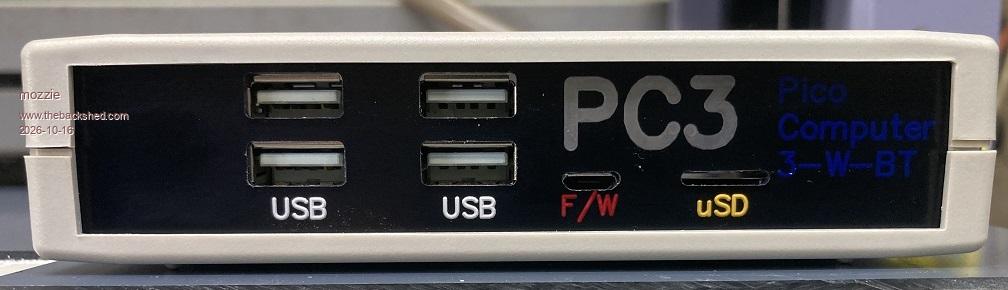
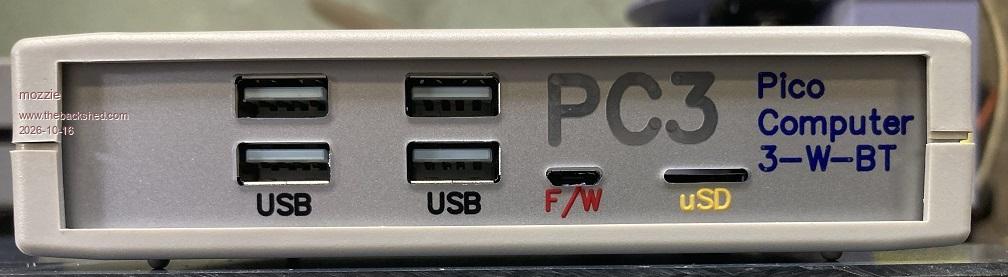
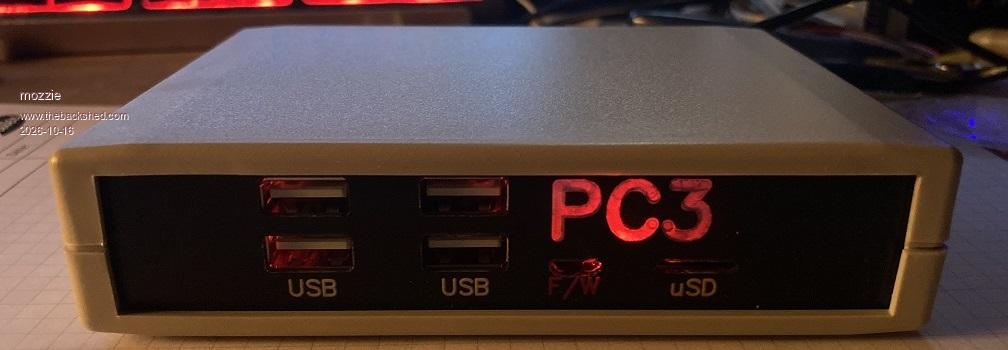
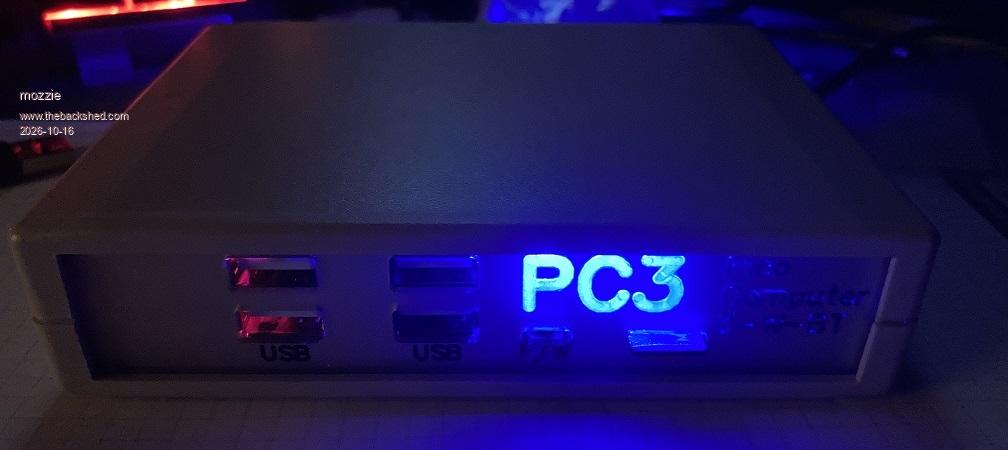
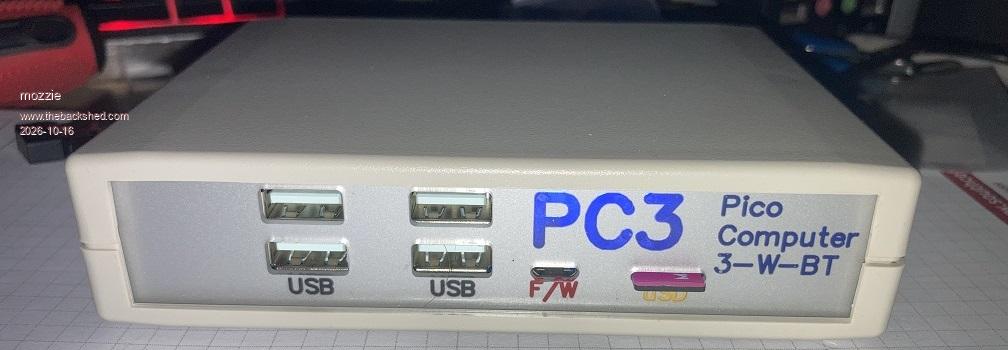
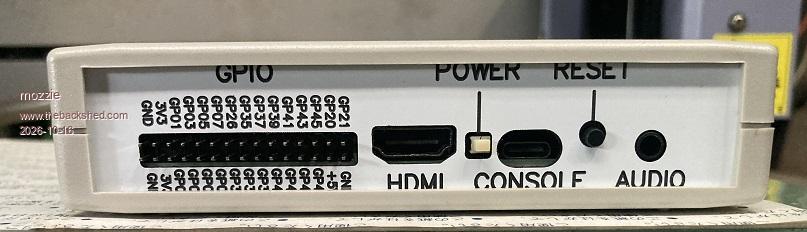
Having said that, whilst ordering engraving sheet for other projects this week I added some extra to finally make some fascias for the PC3 enclosure. After a bit of stuffing around in CAD and with the machine, I must admit I'm pretty stoked with the result
These are "reverse engraved", so the cut is from the back and can be filled with paint for colour or backlit with an LED.
Black on clear first try, needs adjusting:
Silver on Clear second try:
Hearbeat LED as backlight:
Blue LED as backlight in dark:
Blue LED as backlight in light:
Rear Panel, normal front engraved, needs more work:
The font is Simplex and my graphic design skills are terrible, but the reverse engrave technique has always looked good to my mind.
Regards, Lyle.
mozzie Guru Joined: 15/06/2020 Location: AustraliaPosts: 469
Posted: 10:29am 16 Oct 2026
Copy link to clipboard
Print this post
G'day HHTG1968 You have it pretty close:
2.5 Change switch to USB HUB DISABLE
6. Change switch to USB HUB ENABLE when download finishes.
7. Enjoy the new PicoMite goodness
Regards, Lyle.
hhtg1968 Senior Member Joined: 25/05/2023 Location: GermanyPosts: 248
Posted: 11:33am 16 Oct 2026
Copy link to clipboard
Print this post
ok. I will try it soon.
but it seems to be necessary to open the case to use the switch...
Mixtel90 Guru Joined: 05/10/2019 Location: United KingdomPosts: 9234
Posted: 01:12pm 16 Oct 2026
Copy link to clipboard
Print this post
Not on Elemento 2 and (soon to be) PC3xWS Version 2. :) . Edited 2026-10-16 23:12 by Mixtel90Mick
ville56 Guru Joined: 08/06/2022 Location: AustriaPosts: 646
Posted: 08:36am 18 Oct 2026
Copy link to clipboard
Print this post
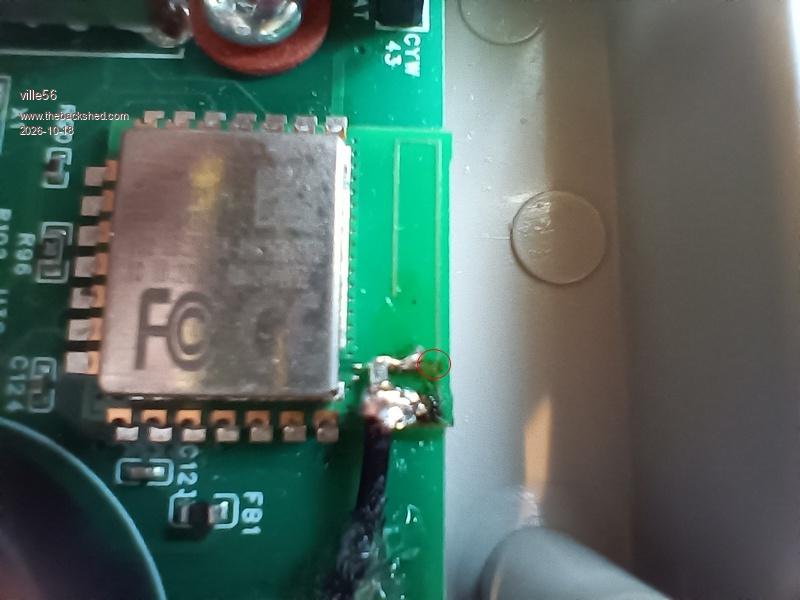
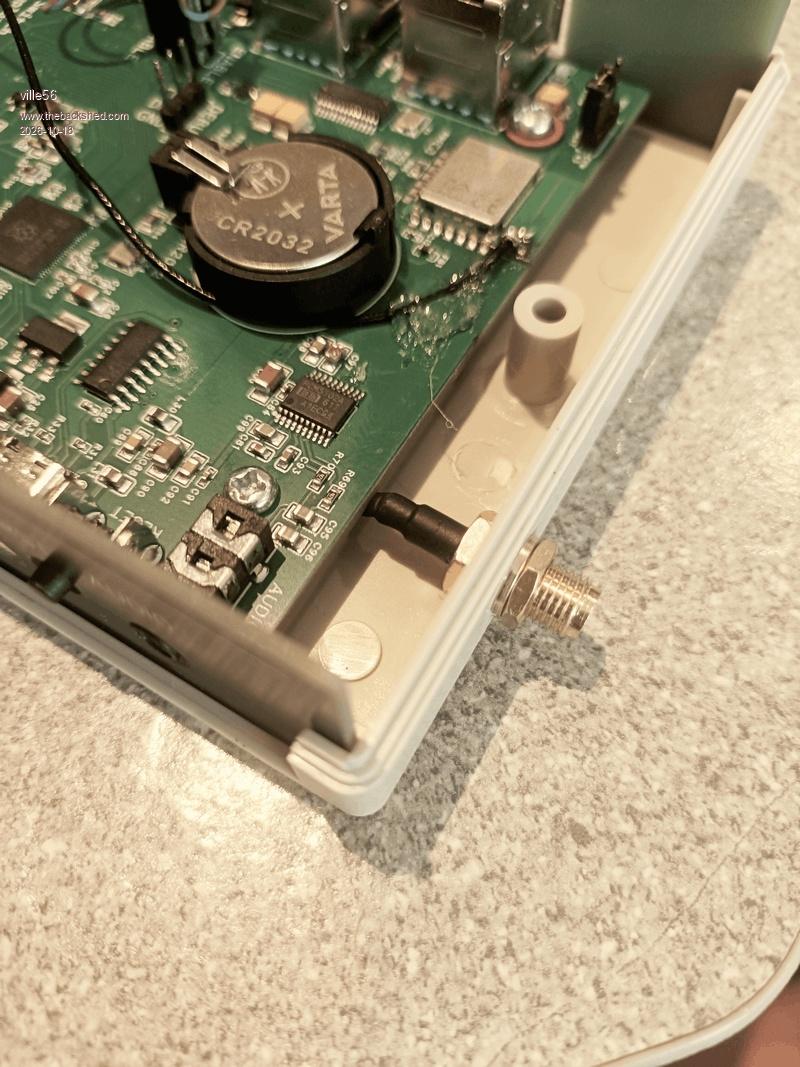
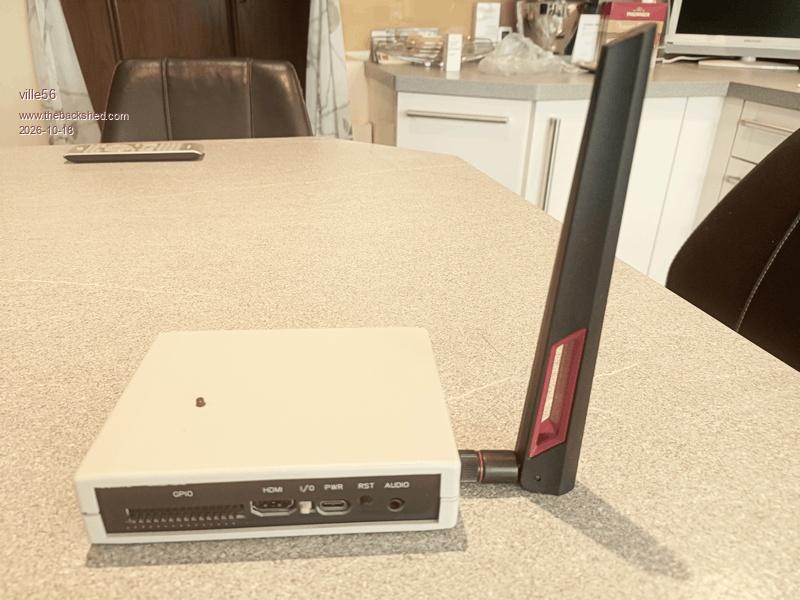
As I do have problems with WiFi coverage, despite a router and 3 repeaters, I've done a mod on the WiFi module to add an external antenna. The mod gives me about 20 - 30 dB gain on the signal (according to the rssi values) and now covers the area I need.
The mod itself was technically easy, just cutting the copper track for the resonant circuit on the module, scraping off the solder mask from the ground and antenna tracks and soldering the coax cable. The point for the cut is between the coax inner conductor solder point and the rightmost PCB track on the first picture (at the red circle). This leaves the antenna connection comeing from under the metal shield free to solder.
It's a bit tiny for sure and my eyes are simply not the best anymore after 70 years of constant usage ... but it worked on the first approach.
The connector is a reverse SMA as all the WiFi antennas I know do use that. The cable had a tiny connector on the other side which I just did cut off. The length of the cable is intentionally for being able to take the PCB out of the case easily. The loss of another 2 or 3 dB because of the additional length should not matter. The strain reliefe is high tech: hotmelt adhesive, but it is important as the coax is really thin stuff as are the PCB tracks.
The most demanding part ...
73 de OE1HGA, Gerald
Mixtel90 Guru Joined: 05/10/2019 Location: United KingdomPosts: 9234
Posted: 08:45am 18 Oct 2026
Copy link to clipboard
Print this post
Do you have a very understanding radio regulations enforcement people in Austria then? And you a radio amateur too. ;)
ville56 Guru Joined: 08/06/2022 Location: AustriaPosts: 646
Posted: 09:02am 18 Oct 2026
Copy link to clipboard
Print this post
Radio regulation ... hmmm, that is a special topic here as probably anywhere in the western countries.
I should have regular inspections from them as licensed amateur, the last one was 17 years ago. They are not overstaffed ... Amateurs reporting spectrum violations are queued at the far end as will be ISM band issues. They certainly do what they can.
So to be practical: if one does not do really harm to the spectrum there, I think noone will or can care. OTOH as the external antenna itself has a maximum theoretical gain of 2,15 dBi and the modules output is 16 dBm it will not exceed the 20 dBm limit. So I assume to be on the safe side with the ERP with the mod. 73 de OE1HGA, Gerald
Mixtel90 Guru Joined: 05/10/2019 Location: United KingdomPosts: 9234
Posted: 09:25am 18 Oct 2026
Copy link to clipboard
Print this post
I don't think it's something I'd get too upset about - and I'm a (non-operational) radio amateur too. :)Mick
Please let me check that I understand this correctly.
The PC3 differs from a standard PicoMite (with an RTC, SD card, and so on) mainly by combining Wi-Fi with an RP2350B. Is the board essentially designed to bring all the available options together in one place? If an individual PicoMite is working properly, should there be no compatibility issues, apart from possibly missing Wi-Fi support and differences in GPIO usage?
And regarding VGA versus HDMI: is VGA still useful, or is it essentially obsolete and mainly kept for running older programs?
matherp Guru Joined: 11/12/2012 Location: United KingdomPosts: 12051
Posted: 11:00am 21 Oct 2026
Copy link to clipboard
Print this post
It doesn't really differ at all. It is just a collection of standard components built into a single PCB. Look at the "PC3x - a modular Pico Computer 3 work-alike" thread. That is all it is. I have though created a particular variant of the firmware to optimise the use of this board by allowing wifi, bluetooth, usb host and hdmi to coexist but that will run just as well on Mick's version as this one
ManiB Senior Member Joined: 12/10/2019 Location: GermanyPosts: 190
Posted: 11:01am 21 Oct 2026
Copy link to clipboard
Print this post
Hi Wölfi,
Yes, that's essentially correct, but the Pico Computer 3 is actually an evolution of Peter Mather's earlier PicoMiteHDMIUSB board, which already used the RP2350B.
The main improvements are support for the Raspberry Pi RM2 wireless module (Wi-Fi and Bluetooth), a simplified 1.3V power supply, improved USB host power management and an additional Qwiic/STEMMA QT connector.
HDMI, USB host, SD card, RTC, PSRAM and I²S audio were already available on the previous board.
So the PC3 is more of a refinement of an already very capable design rather than a completely new computer.
Regarding compatibility, most MMBasic programs should work, provided they don't depend on specific GPIO assignments or firmware features. Some differences between the HDMI, VGA and WEB firmware builds also need to be considered.
And I certainly wouldn't call VGA obsolete. It's still useful for older monitors, retrocomputing and inexpensive DIY systems. The PC3 can even operate with VGA firmware using Peter's small adapter board.
I was just about to reply, but I think he has already explained it perfectly.
I'm using the Pico Computer 3 myself and it has been running very reliably so far.
And I agree that VGA is far from obsolete, especially for retrocomputing and DIY projects.
Manfred Edited 2026-10-21 21:03 by ManiB
Mixtel90 Guru Joined: 05/10/2019 Location: United KingdomPosts: 9234
Posted: 11:14am 21 Oct 2026
Copy link to clipboard
Print this post
The PC3 is designed to be an all-in-one system, purchased ready-built from JLCPCB. It standardizes the hardware used and the GPIO pins so that a single command can be used to set all the OPTIONS necessary automatically without having to do this individually. Because the hardware and configuration are set it is a reference design - all PC3s will behave in the same way.
As soon as you move away from the PC3 design you are on your own. Your OPTIONs will be decded by the particular hardware configuration that you have used and cannot (in most cases) be set automatically like the PC3.
VGA can still be useful! The RP2040 module and its clones don't support HDMI under MMBasic as there's no HSTX on that chip. It's also still perfect if you want to use an old display, of course and it saves a GPIO pin if you want a graphic display but are running out of GPIO. For most purposes the Picomite is standardized on HDMI now though as it is far more versatile.Mick
Thanks guys, for your really helpful replies! I understand it much better now.
And yes, as for VGA: I recently bought a 7-inch monitor to build into a setup - because it connects easily via VGA. I haven’t installed it yet, so I’d almost forgotten about it!
But generally speaking, aside from the price, the RP2350 completely supersedes the RP2040, doesn’t it? Or are there still specific advantages to using the older chip?
matherp Guru Joined: 11/12/2012 Location: United KingdomPosts: 12051
Posted: 11:59am 21 Oct 2026
Copy link to clipboard
Print this post
Now the A4 stepping version of the rp2350 is available there are IMHO no advantages to the rp2040 other than a few cents difference in price
Volhout Guru Joined: 05/03/2018 Location: NetherlandsPosts: 6195
Posted: 12:18pm 21 Oct 2026
Copy link to clipboard
Print this post
Hi Wolfi,
Important to understand: due to chip shortage during Covid, the MMBasic flagship CMM2 (Color Maximite 2) could not be build/sold. Peter stepped in and ported MMBasic to a chip that was available during Covid : The RP2040. And he/Geoff designed a VGA equipped board. That was in 2021/2022. Between 2022 and 2025 the feature set of the VGA platform constantly improved (adding audio, real time clock, USB keyboard, MMBasic updates).
Since then many people build the VGA version of PicoMite. In 2024/2025, the RP2350 (as successor to the original RP2040) was released featuring a HDMI capable hardware block. Since then 2350 based HDMI derivatives where developped (mainly by Peter) leading to the "one board to rule them all PC3.
Due to the larger memory on the 2350, MMBasic has more functions/commands in 2350 compared to 2040. The 2350 and HDMI are the way forward. If you step in now, the PC3 is the way to go.
If you are like me, playing picomite since the beginning, you have been investing in 2040 / VGA / PS2 / WII / NES stuff, and have a hard time parting from it. But also I have a PC3 that is waiting to come into active duty.
Just note: if Covid would not have happened, we all would be riding the CMM2 train now.

 Notice. New forum software under development. It's going to miss a few functions and look a bit ugly for a while, but I'm working on it full time now as the old forum was too unstable. Couple days, all good. If you notice any issues, please contact me.


 Print this post
 (hopefully they'll get together and make some Pico Zero's)





 exactly! amounts of VGA and PS2