Home
JAQForum Ver 24.01
Log In or Join  
Active Topics
Local Time 01:17 22 Apr 2026 Privacy Policy
Jump to

Notice. New forum software under development. It's going to miss a few functions and look a bit ugly for a while, but I'm working on it full time now as the old forum was too unstable. Couple days, all good. If you notice any issues, please contact me.

Forum Index : Microcontroller and PC projects : Editor font.

Author Message
Fede
Newbie

Joined: 09/03/2026
Location: Spain
Posts: 23
Posted: 09:48am 03 Apr 2026
Copy link to clipboard 
Print this post

The editor is very useful and I use it all the time.

Is it possible to change the font in the built-in MMBasic editor?

Font 1 is fine, but font 7 would also be suitable for comfortable working. Font 8 would be for large screens and extreme cases.

That way, I could fit more text on the screen and have longer lines.

Many thanks.
 
PeteCotton

Guru

Joined: 13/08/2020
Location: Canada
Posts: 628
Posted: 04:33pm 04 Apr 2026
Copy link to clipboard 
Print this post

Yes.

OPTION EDIT FONT SMALL
OPTION EDIT FONT NORMAL

etc.

And use it with OPTION DEFAULT MODE to set your default display resolution (for larger screens).


Edited 2026-04-05 02:34 by PeteCotton
 
matherp
Guru

Joined: 11/12/2012
Location: United Kingdom
Posts: 11215
Posted: 04:52pm 04 Apr 2026
Copy link to clipboard 
Print this post

The editor has been re-worked in the 6.02.02 beta for VGA and HDMI versions as follows:
  Quote  Editor Entry Decision Logic
When the editor is invoked, three values are sampled: the current display mode (DISPLAY_TYPE), the current font (via gui_font_width), and Option.ColourCode. The key metric is chars_per_line = HRes / gui_font_width.

Five rules, evaluated in order:

# Condition Action
1 chars_per_line ≥ 64, ColourCode = 0 No mode or font change. Tiles set to white-on-black (Mode 1 only).
2 chars_per_line ≥ 64, ColourCode = 1, mode ≠ 1 No change. Colour coding works natively in Modes 2–5.
3 chars_per_line ≥ 64, ColourCode = 1, Mode 1, font width divisible by 8 No change. Font aligns to tile boundaries so colour coding works.
4 chars_per_line ≥ 64, ColourCode = 1, Mode 1, font width NOT divisible by 8 Switch font to font1 (8×12) so tiles align. Mode stays at 1. HDMI high-res (≥1024) uses font3 (16×24) instead.
5 chars_per_line < 64 Switch to Mode 1 and font1 (8×12). HDMI high-res uses font3 (16×24).
Only rules 4 and 5 change anything. Rules 1–3 preserve the user's mode and font untouched.

After the decision block:

The framebuffer is cleared (memset WriteBuf).
If in Mode 1 without ColourCode, all tiles are forced to white-on-black so the 1-bit framebuffer is readable.
ytileheight is set to gui_font_height for tile-row calculations.
If ColourCode is on, gui_fcolour/gui_bcolour are set to white/black and the screen is cleared.
If editing program memory (cmdfile), ClearRuntime is called — which internally calls ResetDisplay and overwrites the font. The font chosen by the decision block is saved beforehand and restored immediately after.
Separator line: drawn in GUI_C_LINE (magenta) when ColourCode is on, or gui_fcolour (white) when ColourCode is off.

Editor Exit
The original mode and font (saved as oldmode/oldfont) are always restored unconditionally via ResetDisplay() + SetFont(oldfont).
The do_end() path (for program-memory editing) calls setmode() which also calls ResetDisplay(), so SetFont(oldfont) and PromptFont = oldfont are applied again after do_end() returns, before longjmp back to the prompt.
 
Peter63
Senior Member

Joined: 28/07/2017
Location: Sweden
Posts: 153
Posted: 04:00am 05 Apr 2026
Copy link to clipboard 
Print this post

Hello, Fede

Are you using PicoCalc ?

/Peter63
 
Fede
Newbie

Joined: 09/03/2026
Location: Spain
Posts: 23
Posted: 06:00am 05 Apr 2026
Copy link to clipboard 
Print this post

Thanks. Thank you so much for the information.  

I don't use PicoCalc much.

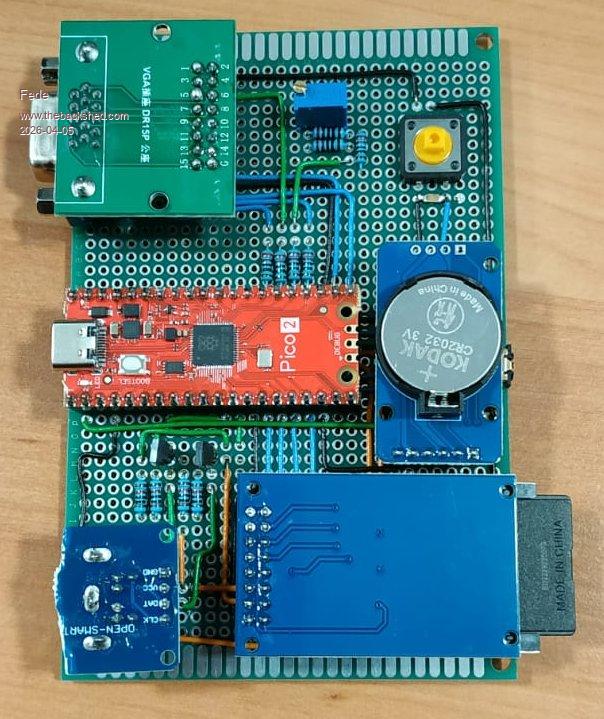
I program in the VGAPicoMite that I built myself and then check if it works in PicoCalc.

I find it more convenient that way.

And while we're at it, here are a few photos.  


The bad thing is that my short vacation is about to end.
 
Peter63
Senior Member

Joined: 28/07/2017
Location: Sweden
Posts: 153
Posted: 06:22am 05 Apr 2026
Copy link to clipboard 
Print this post

  Quote  I program in the VGAPicoMite that I built myself and then check if it works in PicoCalc.

I find it more convenient that way.

And while we're at it, here are a few photos.


Ok, I also usually do something similar when I test things.

  Quote  Is it possible to change the font in the built-in MMBasic editor?

Font 1 is fine, but font 7 would also be suitable for comfortable working. Font 8 would be for large screens and extreme cases.

That way, I could fit more text on the screen and have longer lines.


Have you tried so you get longer lines?

/Peter63
 
phil99

Guru

Joined: 11/02/2018
Location: Australia
Posts: 3156
Posted: 06:41am 05 Apr 2026
Copy link to clipboard 
Print this post

Despite limited screen width lines can be 255 characters.

One method is to press <enter> just before the edge of the screen and continue on the next line. When the line is complete go back and delete the unwanted CR.
You won't be able to see the rest of the line but it is still there.
If you need to edit that line break it with <enter> near the RHS and the next portion appears.

And the other
  p102 said  OPTION CONTINUATION LINES ON/OFF
Enables or disables the use of continuation lines in the editor and with the LIST command.
Line continuation is indicated by a space followed by an underscore character at the end of a line.
When enabled the editor will automatically split lines as it reads them from file and add the continuation characters required.
When exiting the editor, the continuation characters are removed before saving.
While in the editor the user can create long lines by adding their own continuation characters.
This makes using a small screen as a console much easier.

Edited 2026-04-05 16:45 by phil99
 
Fede
Newbie

Joined: 09/03/2026
Location: Spain
Posts: 23
Posted: 07:45pm 05 Apr 2026
Copy link to clipboard 
Print this post

  PeteCotton said  Yes.

OPTION EDIT FONT SMALL
OPTION EDIT FONT NORMAL

etc.

And use it with OPTION DEFAULT MODE to set your default display resolution (for larger screens).


It's a shame, but that command no longer exists.

I haven't been able to get font 7 to work in the editor.

Oh well, it's not too bad.  

Thanks to everyone for the advice.
 
toml_12953
Guru

Joined: 13/02/2015
Location: United States
Posts: 602
Posted: 08:26pm 05 Apr 2026
Copy link to clipboard 
Print this post

  PeteCotton said  Yes.

OPTION EDIT FONT SMALL
OPTION EDIT FONT NORMAL

etc.

And use it with OPTION DEFAULT MODE to set your default display resolution (for larger screens).


What version has OPTION EDIT in it? I can't find it in the 6.00.01 manual and it doesn't seem to work in 6.00.02b0, at least on a PicoCalc. Is it for VGA/HDMI only? Where can I find a manual that includes it?
 
matherp
Guru

Joined: 11/12/2012
Location: United Kingdom
Posts: 11215
Posted: 08:48pm 05 Apr 2026
Copy link to clipboard 
Print this post

  Quote  It's a shame, but that command no longer exists.

Never did - it is a CMM2 command
You don't say what version so diffiecult to give the answer. On RP2350 VGA or HDMI then
OPTION DEFAULT MODE 3
OPTION LCDPANEL CONSOLE 7
 
Fede
Newbie

Joined: 09/03/2026
Location: Spain
Posts: 23
Posted: 03:33pm 06 Apr 2026
Copy link to clipboard 
Print this post

Oh, thank you so much! Almost!

Everything changes except the editor.

I'm using an RP2350 VGA version 6.0201.

Sorry for the omission.
 
matherp
Guru

Joined: 11/12/2012
Location: United Kingdom
Posts: 11215
Posted: 04:26pm 06 Apr 2026
Copy link to clipboard 
Print this post

You need the 6.02.02 beta
 
Fede
Newbie

Joined: 09/03/2026
Location: Spain
Posts: 23
Posted: 06:13pm 06 Apr 2026
Copy link to clipboard 
Print this post

Ok. Thank you.
 
Print this page


To reply to this topic, you need to log in.

The Back Shed's forum code is written, and hosted, in Australia.
© JAQ Software 2026