Notice. New forum software under development. It's going to miss a few functions and look a bit ugly for a while, but I'm working on it full time now as the old forum was too unstable. Couple days, all good. If you notice any issues, please contact me.
jwettroth Regular Member Joined: 02/08/2011 Location: United StatesPosts: 86
Posted: 02:02pm 02 May 2026
Copy link to clipboard
Print this post
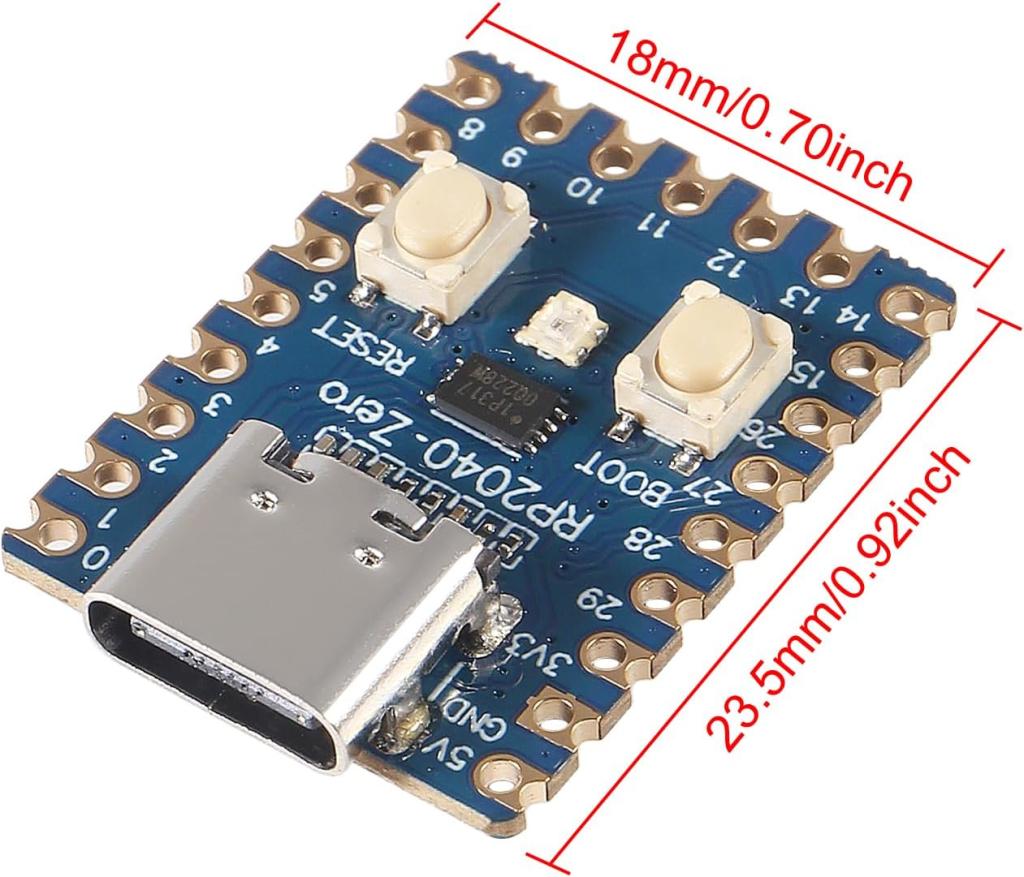
Amazon sells these little RP2040 boards for about $2 ($20 for ten). USB C connector, boot and reset buttons and about an inch square. I bought a few to play and use them with Arduino IDE but plan to use the real SDK. Has anyone experimented with MMBasic on them? I have a lot of little tasks in my lab where one of these running basic could be awesome. It would be really cool if I could just plug in, use the USB console with editor etc and then set them to autorun. A replacement for the old Picaxe!
Is there any reason that MMBasic won't run on one, I'm going to give it a shot but wanted to share, know others experience and any gotchas.
Thanks.
Footnote added 2026-05-03 12:04 by jwettroth The title of this post was was originally reffering RPi Pico "Zero" Mini boards- I guess this was a trademark or unwanted word. It kind of loses it meaning with just the RPi Pico 2040....John Wettroth
JohnS Guru Joined: 18/11/2011 Location: United KingdomPosts: 4391
jwettroth Regular Member Joined: 02/08/2011 Location: United StatesPosts: 86
Posted: 02:18pm 02 May 2026
Copy link to clipboard
Print this post
Very cool, I tried it and it just works! Quite cool, amazing.
I have a little example app that run a WS2812 that takes console input for RGB levels.
I ran into one oddity. After it runs, the terminal screen goes black (using Teraterm). This might just be terminal settings? When I run editor, it fixes it and I get color highlighted source code.
Are there any oddities you've noted?
I don't know why I never thought to do this before.John Wettroth
Volhout Guru Joined: 05/03/2018 Location: NetherlandsPosts: 6195
Posted: 02:47pm 02 May 2026
Copy link to clipboard
Print this post
Mmbasic runs fine on RP2040 zero. I have several in measuremen instrumenta, and Mick uses one as fish tank controller.
Mixtel90 Guru Joined: 05/10/2019 Location: United KingdomPosts: 9238
Posted: 03:57pm 02 May 2026
Copy link to clipboard
Print this post
One of my favourite little modules. :) Just remember that you have to treat it as a standard Pico though. You get the added bonus of GP29. Unfortunately the castellated connections are wasted unless you cut a hole or notch in the PCB.Mick
Mixtel90 Guru Joined: 05/10/2019 Location: United KingdomPosts: 9238
Posted: 05:10pm 02 May 2026
Copy link to clipboard
Print this post
I would now, but I didn't have that choice at the time. :) Exactly the same problem with the castellated connections though. Still, you can't have everything. :) I did a design using the RP2040-Zero for a game controller some time ago, cutting a notch out of the board and having the USB-C connector accessible at the back.Mick
jwettroth Regular Member Joined: 02/08/2011 Location: United StatesPosts: 86
Posted: 12:11am 03 May 2026
Copy link to clipboard
Print this post
I'll also probably end up making my own with RP2350. I need the low power features of the 2350. With the RP2040, I'm power gating the whole board externally. Debating whether to remove the 3.3v regulator- experimenting. I'm using a Diodes Inc AP7361EA in front of it for the low power shutdown that does some other shutdown. Bound to become a favorite.
Mick- what did you mean in your response above that you have to treat it as a regular RPi Pico? Do you mean, you can't run exotic firmware variants?
Lizby- your board looks very useable. Nice job.
Thanks all. Edited 2026-05-03 10:19 by jwettrothJohn Wettroth
Mixtel90 Guru Joined: 05/10/2019 Location: United KingdomPosts: 9238
Posted: 07:02am 03 May 2026
Copy link to clipboard
Print this post
A standard Pico uses the RP2040. The Pico 2 uses the RP2350. You can only run the RP2040 versions of MMBasic on the RP2040-Zero. I would still say that's reasonably exotic for such a cheap little module though. :)
As Lizby points out, there is also a RP2350-Zero which looks almost identical. That will obviously run the RP2350 versions of MMBasic, but not the HDMI versions.
Both of these modules, along with most cheap clones, use linear regulators - not the switchers that are on the Pico modules. This makes them even less attractive for battery powered systems unless you use an external switcher to power them at 3V3.
Note that the Zero boards don't have the facility to disable the on-board linear regulator. I have powered them at 3V3 though by leaving the 5V pin disconnected. Also, they don't have a diode from VUSB to the 5V pin so the USB input supply can't be isolated from your circuit. That can make things awkward sometimes.Mick

 Notice. New forum software under development. It's going to miss a few functions and look a bit ugly for a while, but I'm working on it full time now as the old forum was too unstable. Couple days, all good. If you notice any issues, please contact me.


 Print this post