Notice. New forum software under development. It's going to miss a few functions and look a bit ugly for a while, but I'm working on it full time now as the old forum was too unstable. Couple days, all good. If you notice any issues, please contact me.
Peter63 Senior Member Joined: 28/07/2017 Location: SwedenPosts: 217
Posted: 06:52am 07 Mar 2026
Copy link to clipboard
Print this post
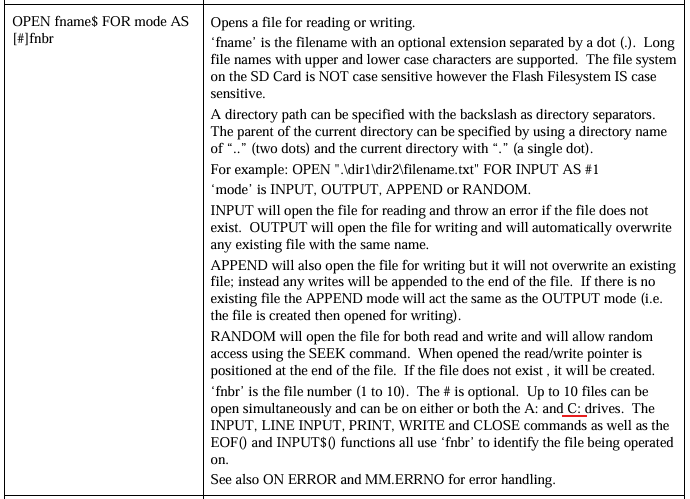
Notes on MMBasic BASIC Interpreter Ver 6.02.00 - manual
maybe change to B:
/Peter63
phil99 Guru Joined: 11/02/2018 Location: AustraliaPosts: 3416
Posted: 07:24am 07 Mar 2026
Copy link to clipboard
Print this post
Presumably the last sentence of the first paragraph will also be updated, as A: is no longer case sensitive.
lizby Guru Joined: 17/05/2016 Location: United StatesPosts: 3885
Posted: 09:30pm 08 Mar 2026
Copy link to clipboard
Print this post
Regarding SPRITE SET TRANSPARENT n, the manual says "Sets the colour code (0-15) which will be used as transparent when sprites are displayed over a background (defaults to 0)."
I had difficulty finding out what the colour codes 0-15 stood for, other than 0 for black. A search of the forum found a Peter Mather post which gave some numbers and a clue to what they derived from: RGB121 values. It appears to distill down to this, and some indication in the manual might help:

 Notice. New forum software under development. It's going to miss a few functions and look a bit ugly for a while, but I'm working on it full time now as the old forum was too unstable. Couple days, all good. If you notice any issues, please contact me.

 Print this post